Best AI Video Generators in 2026: Tested and Ranked
OpenAI killed Sora, native audio became table stakes, and prices quietly restructured across the board. We ranked the AI video generators actually worth paying for in 2026 — from Runway and Veo to Kling, Higgsfield, and the avatar tools.
The AI video landscape looks nothing like it did a year ago, and the single biggest reason is subtraction rather than addition: OpenAI shut Sora down. The app and web experience went dark on April 26, 2026, and the API follows on September 24, 2026 — about a month from the time of writing. The most hyped name in AI video is simply gone, and with it went a planned $1 billion Disney partnership.
What replaced the hype is something more useful: a field of tools that actually ship. Native synced audio went from a party trick to table stakes. Multi-shot sequences with consistent characters became genuinely workable. And pricing quietly restructured almost everywhere — Runway retired its unlimited tier, Kling stacked five plans up to $180/month, and credit systems got more confusing, not less.
We tested and tracked the current field to work out which tools are worth your money. One important framing before the list: "AI video generator" covers two completely different products. Creative generators like Runway and Kling invent footage from prompts. Avatar tools like Synthesia and HeyGen turn a script into a person talking to camera. Buying the wrong category is the most common and most expensive mistake we see.
The short answer: Runway is the best all-round creative generator, Kling 3.0 is the best value and the best at native dialogue, Google's Veo 3.1 is the easiest quality win if you already pay Google, Higgsfield is the fastest route to viral social clips (with real caveats), and Synthesia or HeyGen are what you actually want if your video is a person talking.
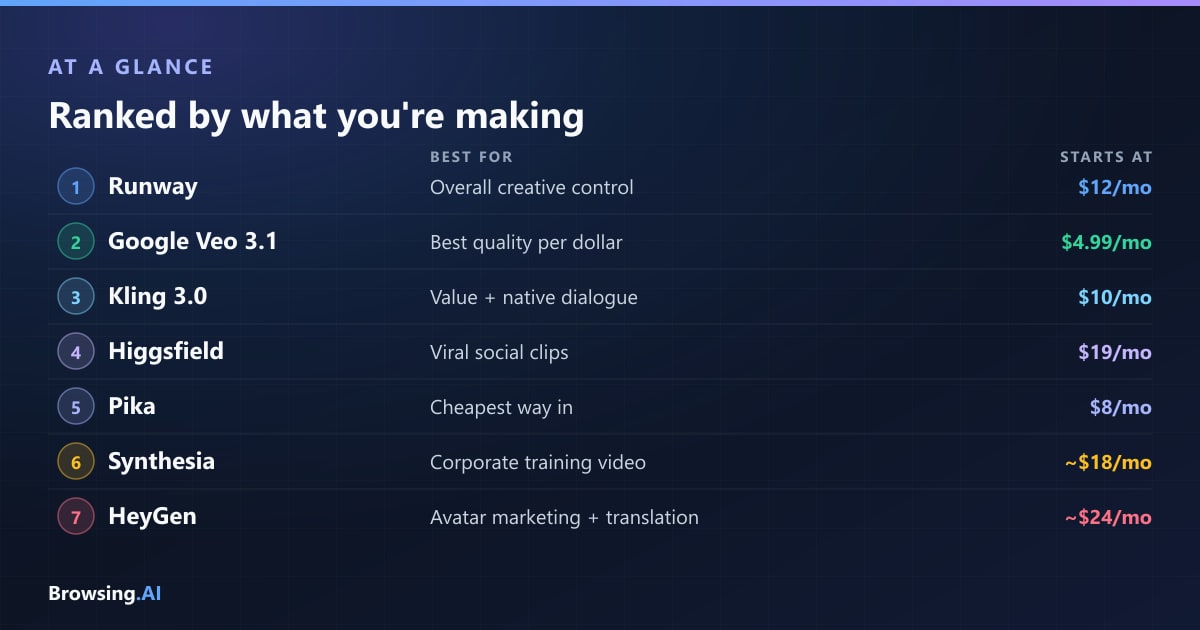
The Best AI Video Generators at a Glance
| Tool | Best for | Native audio | Free tier | Starts at |
|---|---|---|---|---|
| Runway | Overall creative control, pro workflows | Limited | 125 one-time credits | $12/user/mo (annual) |
| Google Veo 3.1 | Best quality if you're already in Google | Yes | 50 Flow credits/day | $4.99/mo (AI Plus) |
| Kling 3.0 | Value, physics, multi-shot dialogue | Yes (Omni) | 66 credits/day | $10/mo |
| Higgsfield | Viral social clips, camera presets | Via wrapped models | Trial credits only | $19/mo (annual) |
| Pika | Cheap, fun, effect-driven shorts | Limited | 250 credits/mo | $8/mo |
| Synthesia | Corporate training and L&D video | Yes (voice) | Yes | ~$18/mo (annual) |
| HeyGen | Avatar marketing, video translation | Yes (voice) | Yes | ~$24–29/mo |
How We Ranked Them
We weighted four things: output quality on realistic prompts, how much control you get over the result, honest cost per usable clip, and whether the tool fits a real workflow rather than a demo.
One caveat worth stating plainly: a lot of the "benchmark" numbers circulating in AI video are vendor self-reported, and the independent leaderboards that do exist — like the Artificial Analysis text-to-video arena, where Runway's Gen-4.5 currently sits at the top — measure prompt-to-clip quality, not whether a tool is pleasant to work in. Where evidence is thin, we say so rather than inventing precision. Our full category roundup lives at best AI video tools.
1. Runway — Best Overall for Creative Control
Verdict: the professional's pick, and the one to beat on control.
Runway's Gen-4.5 is the current flagship and holds the top spot on the Artificial Analysis text-to-video benchmark. But quality is not really why people pay for Runway — control is. Reference-image conditioning, strong character consistency across shots, video-to-video, and an actual editing environment make it the only tool on this list that feels like it belongs in a production pipeline rather than beside one.
That makes it the natural choice for agencies, marketers, and filmmakers who need a specific result rather than a lucky one. The trade-off is cost and a real learning curve: the interface rewards people who invest time in it, and Gen-4.5 burns 12 credits per second, which adds up faster than the plan prices suggest.
Pricing: Free gives you 125 one-time credits that never refresh (roughly five seconds of Gen-4.5 — an evaluation, not a free tier). Standard is $12/user/month annually ($15 monthly) for 625 credits, Pro is $28/user/month annually ($35 monthly) for 2,250 credits, and Max is $76/user/month annually (~$95 monthly) for 9,500 credits with one-month rollover. The old unlimited plan is gone for new buyers. Enterprise is custom.
If you're weighing it against avatar tools, our Runway vs Synthesia comparison covers why they rarely compete for the same job.
2. Google Veo 3.1 — Best Quality Per Dollar
Verdict: the easiest quality win, especially if you already pay Google.
Veo 3.1 is the model most likely to make you say "that looks real" on the first generation, and its native audio — synced dialogue, ambience, effects generated with the video — is genuinely strong. Access comes bundled through Google's consumer AI plans rather than as a standalone video subscription, which is what makes it such good value.
Google AI Plus starts around $4.99/month with 200 Flow credits, AI Pro is about $19.99/month for 1,000 credits, and AI Ultra runs about $99.99/month for 10,000. Flow, Google's filmmaking front-end, also gives non-subscribers roughly 50 free credits a day — one of the more genuinely usable free offerings in the category. Flow splits Veo 3.1 into Lite, Fast, and Quality tiers, so credit burn varies a lot with which one you pick. Developers pay about $0.15/second for Fast and $0.40/second for Standard via the API, audio included.
The weaknesses are ecosystem-shaped: you're inside Google's tooling, the credit-to-output math is opaque, and Flow is less of a precision editor than Runway.
3. Kling 3.0 — Best Value and Best Native Dialogue
Verdict: the price-performance champion, and quietly the best at talking characters.
Kling, from Kuaishou, has spent two years being underrated by Western creators, and Kling 3.0 Omni is where that stops being defensible. It leads on native audio and dialogue — lip-sync across five languages and a shared audio timeline that holds across multi-shot sequences — and its physics and motion handling are among the best in the field. The Omni storyboard tool gives you per-shot control over duration, framing, camera movement, and pacing, then weaves the shots into one sequence.
It's also the cheapest premium model, at roughly $0.10 per second. Plans run Free ($0, 66 daily credits), Standard $10/month, Pro $37/month, Premier $92/month, and Ultra $180/month, with annual billing saving about 34% on the middle three (Ultra has no annual option). New subscribers typically get a discounted first month.
The catch is the usual one for Chinese-developed platforms: interface polish and support lag the Western tools, and enterprise buyers will want to think carefully about data governance before standardizing on it.
4. Higgsfield — Best for Viral Social Content
Verdict: the fastest path from idea to shareable clip — with caveats you should take seriously.
Higgsfield took a different bet from everyone else on this list: rather than train a flagship model, it wraps 30+ third-party models (including Veo, Kling, and Seedance) behind one login, and layers on 70+ one-tap cinematic camera presets — bullet time, crash zoom, dolly, 360 — plus 40+ viral VFX templates. For short-form social work that is a genuinely great workflow. Applying a camera preset feels more like directing than prompting, and its Soul model holds a consistent character across generations, which is why AI-influencer creators love it.
The caveats are real, though, and we rated it 3.5/5 for exactly this reason. A February 2026 Forbes investigation documented racist videos and nonconsensual celebrity deepfakes alongside lax moderation, and users have reported billing frustrations where "unlimited" tiers turned out to be time-boxed. Credits don't roll over on individual plans.
Pricing (billed annually): Starter $19/month for 270 credits, Plus $47/month for 1,200 credits ($59 monthly), and Ultra $99/month for 3,000 credits ($129 monthly). Teams start at $65/seat and Scale at $150/seat. There's no standing free plan — just trial credits. Our full Higgsfield review digs into all of it.
5. Pika — Best Cheap Entry for Fun Clips
Verdict: the low-stakes way in, if you're not doing client work.
Pika has never tried to win on realism, and it's better for it. Pikaffects — the one-tap effects that inflate, melt, crush, or explode your subject — are built for social engagement rather than cinematic fidelity, and they're fun in a way most of this category isn't.
The free tier gives 250 credits a month but caps you at three-second, watermarked clips. Standard is $8/month for 700 credits with all Pikaffects, Pro is $28/month and is realistically the minimum for commercial or client work, and Fancy is $76/month for high-volume teams. Annual billing saves 20%.
It's the weakest pick here for realism, long clips, or professional output — but at $8/month, it's also the cheapest way to find out whether AI video fits your workflow at all.
6. Synthesia — Best for Corporate Training Video
Verdict: the enterprise standard for turning documents into presenters.
Now we switch categories entirely. Synthesia doesn't generate scenes — it generates a person delivering your script, in a huge range of languages, with brand controls, templates, and the compliance posture large organizations need. For onboarding, compliance training, product explainers, and internal comms, it's the safest choice on this page.
Free tier available; Starter runs about $18/month billed annually ($29 monthly), Creator about $64/month annually ($89 monthly), and Enterprise is a custom quote. The limitation is inherent to the format: everything is a person talking to camera, and no amount of budget makes it cinematic.
7. HeyGen — Best for Avatar Marketing and Translation
Verdict: the creator-friendly avatar tool, and the best at video translation.
HeyGen plays the same game as Synthesia but for a faster-moving audience. Its avatars are more lifelike, iteration is quicker, and its standout feature is video translation — take a talking-head video and get it back speaking another language with matched lip movement. For marketing teams localizing content, that alone justifies the subscription.
Free tier available; Creator is roughly $24–29/month depending on billing, and Business is $149/month plus $20 per seat, which is self-serve rather than sales-gated — a real advantage over Synthesia's enterprise motion for mid-size teams. See HeyGen vs Synthesia for the direct head-to-head.
What Happened to Sora?
If you came here looking for Sora, this is the section you need. OpenAI announced in late March 2026 that it was discontinuing Sora entirely. The app and web experience shut down on April 26, 2026, and the API is scheduled to shut down on September 24, 2026.
The economics were brutal: reporting put Sora's operating costs at roughly $1 million per day against about $2.1 million in in-app purchases across the product's entire lifetime. OpenAI framed the decision as a strategic refocus toward agentic AI and robotics. The collateral damage was significant — Disney walked away from a planned $1 billion investment and a three-year licensing deal that would have brought 200+ Disney, Marvel, Pixar, and Star Wars characters into Sora.
The practical consequence for you: ChatGPT no longer generates video from text prompts. Image generation inside ChatGPT is unaffected and continues as normal. If you had a workflow built on the Sora API, you have until late September to migrate — Veo 3.1 and Kling 3.0 are the closest replacements on quality, and Runway is the closest on control.
Creative Generation vs Avatar Video: Know Which You Need
This is the distinction that saves people the most money, so it's worth being blunt about.
Creative generators (Runway, Veo, Kling, Higgsfield, Pika) invent footage. You describe a scene and get a scene. They're for b-roll, concept work, ads, music videos, social content, and anything where the camera is looking at a world rather than a presenter. They're also inconsistent by nature — you generate several takes and pick.
Avatar tools (Synthesia, HeyGen) render a presenter. You supply a script and get a person delivering it, reliably, on brand, in many languages. They're for training, onboarding, explainers, and localized marketing. They're extremely consistent and completely unable to make a cinematic shot.
If your video is fundamentally "a person explaining something," every creative generator on this list is the wrong tool and will cost you weeks. If your video is "footage of something happening," no avatar tool will ever get you there.
What About Cost? A Reality Check
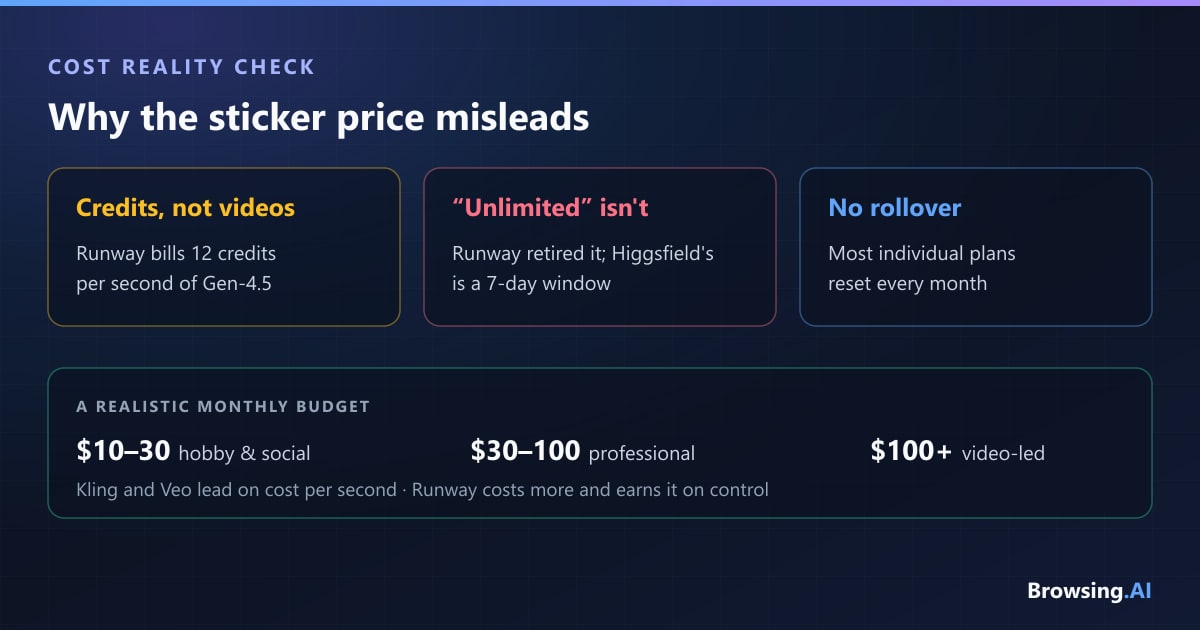
Sticker prices are misleading across this entire category, for three reasons.
Credits, not videos. Almost nothing here is priced per video. Runway charges 12 credits per second of Gen-4.5; Kling, Veo, and Higgsfield all meter by model and resolution. A $12 plan can evaporate in an afternoon of iteration, and iteration is the job — you rarely get a usable clip on the first generation.
"Unlimited" usually isn't. Runway retired its unlimited tier for new buyers. Higgsfield's "unlimited" labels turn out to be seven-day windows on specific models. Assume throttling exists until proven otherwise.
Credits mostly don't roll over. Runway's Max plan offers one month of rollover; most individual plans elsewhere reset. Budget for the volume you'll actually generate, not the volume you'll ship.
A realistic budget: about $10–30/month for hobby and social work, $30–100/month for consistent professional output, and meaningfully more if video is central to your business. Kling and Veo currently offer the best cost-per-second; Runway costs more and earns it on control.
Frequently Asked Questions
What is the best AI video generator in 2026? Runway is the best overall for creative work thanks to its control and editing tools, with Gen-4.5 currently topping the independent Artificial Analysis text-to-video benchmark. But Kling 3.0 offers better value and stronger native dialogue, and Veo 3.1 is the best quality-per-dollar if you already pay for a Google AI plan. For talking-head business video, Synthesia and HeyGen win instead.
Which AI video generator is free? Google's Flow offers roughly 50 free credits per day, which is the most usable free option. Kling gives 66 daily credits, and Pika gives 250 monthly credits with watermarked three-second clips. Runway's "free" tier is 125 one-time credits that never refresh — an evaluation, not a free plan. Higgsfield has no standing free plan, only trial credits.
Can AI video generators make audio too? Yes, and in 2026 this became a real differentiator rather than a novelty. Veo 3.1 generates synced dialogue, ambience, and effects natively. Kling 3.0 Omni does the same with lip-sync across five languages and a shared audio timeline across multi-shot sequences. Runway and Pika remain more limited here, and avatar tools like Synthesia and HeyGen generate voice by design.
Is AI video safe to use commercially? Two separate risks. On licensing, check each tool's commercial terms — Pika, for example, effectively requires its Pro tier for commercial work, while enterprise plans elsewhere carry stronger indemnities. On likeness, be much more careful: Higgsfield in particular drew a Forbes investigation in February 2026 over nonconsensual deepfakes, and generating recognizable real people without consent creates genuine legal and ethical exposure regardless of which tool you use.
How long can AI-generated videos be? Individual clips are still short — typically 5 to 10 seconds per generation across most tools, with Pika's free tier capped at three. Longer videos are assembled from multiple generations, which is exactly why multi-shot consistency features like Kling's Omni storyboard and Runway's reference conditioning matter more than raw clip length.
Final Verdict
There's no single winner, because these tools aren't solving the same problem. If you want one recommendation per job:
- Professional creative work: Runway — the control and editing workflow justify the price
- Best value and native dialogue: Kling 3.0 — cheapest premium model, genuinely strong output
- Best if you're already in Google: Veo 3.1 via a Google AI plan — superb quality, low marginal cost
- Viral social content: Higgsfield — unbeatable camera presets, but read our caveats first
- Cheapest way to experiment: Pika at $8/month
- Corporate training video: Synthesia
- Avatar marketing and localization: HeyGen
The bigger lesson from 2026 is that hype and durability are different things. Sora had the most attention in the category and shut down anyway, while Kling quietly got very good and very cheap. Test on free tiers with your own real prompts before committing — the gap between a demo reel and your actual use case is still where most of the disappointment lives.
Explore the full best AI video tools roundup, compare Runway alternatives, or browse the complete AI tools directory.
author
Dusan Kovacevic
Published August 24, 2026 · Updated August 24, 2026
continue reading
Related articles
Cursor vs GitHub Copilot vs Windsurf: Which AI Coding Assistant Is Best in 2026?
We spent months coding in Cursor, GitHub Copilot, and Windsurf on real production repos. Here is which AI coding assistant wins on autocomplete, agentic editing, and pricing — and which one you should actually pay for in 2026.
Read
GitHub Copilot vs Cursor vs Tabnine: Which AI Coding Assistant Wins in 2026?
We tested GitHub Copilot, Cursor, and Tabnine on real codebases — React, Python, and a legacy Node.js project. Here's which one wins for completions, multi-file editing, privacy, and price.
Read
Midjourney vs Leonardo vs DALL-E: Which AI Image Generator Wins in 2026?
We ran identical prompts through Midjourney, Leonardo AI, and DALL-E to settle the question. Here's which one wins for quality, prompt control, workflow, and price — and which one you should actually pay for.
Read